
Differences between Windows 10 and Windows 11
Differences Between Windows 10 and Windows 11: Should You Upgrade?
Windows 11 is the latest iteration of Microsoft’s operating system, but is it really that different from Windows 10? If you’re wondering whether to stick with Windows 10 or upgrade to Windows 11, this guide will break down the key differences in a way that’s easy to understand.
1. User Interface and Design
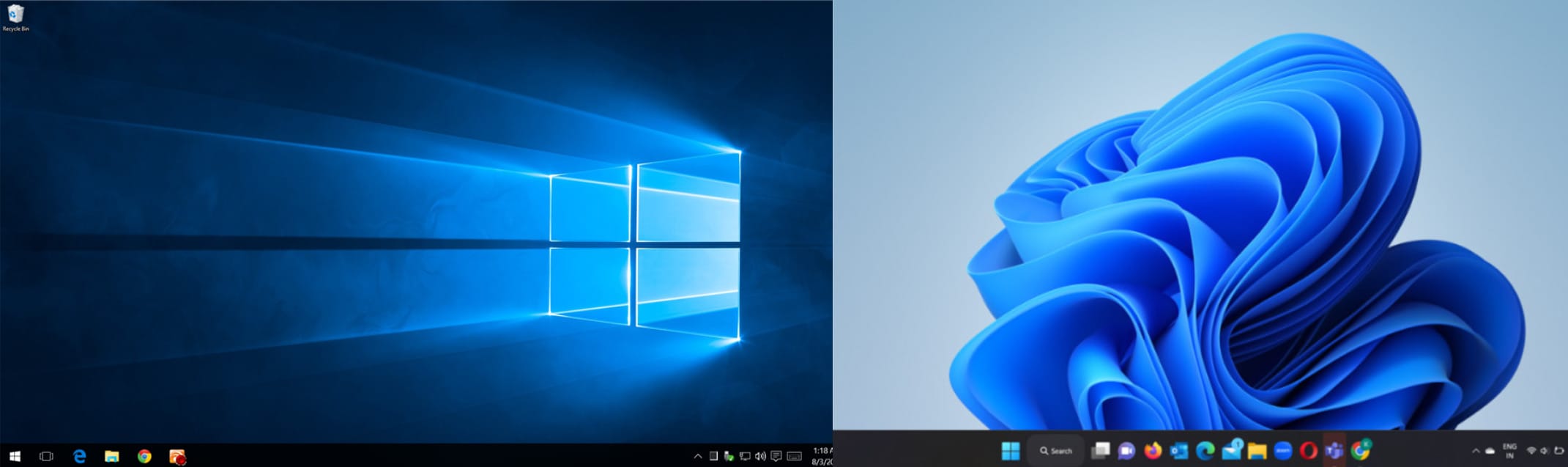
One of the most noticeable differences between Windows 10 and Windows 11 is the user interface. Windows 11 offers a more modern, sleek, and minimalistic design compared to Windows 10. Here are some major UI changes:
- Centered Start Menu: The Start Menu is now centered, giving a macOS-like appearance, but you can still move it to the left if you prefer the classic look.
- Rounded Corners: Windows 11 introduces softer, rounded corners for app windows and menus, making the UI look more refined.
- New Icons and Themes: Microsoft has updated the icons, themes, and animations, making them more visually appealing and fluid.
2. Performance and Speed
Windows 11 is optimized for better performance, promising faster boot times, improved memory management, and better efficiency.
- Better Resource Management: Windows 11 prioritizes foreground tasks, meaning apps running in the background won’t slow down performance as much.
- DirectStorage Support: This feature allows games to load assets directly from the SSD to the GPU, reducing load times significantly.
- Improved Snap Layouts: Windows 11 allows for more intuitive multitasking with enhanced Snap Layouts, making window management easier.
To read more blogs, click here..
3. Gaming Enhancements
If you’re a gamer, Windows 11 offers several new features designed to improve gaming performance.
- Auto HDR – Automatically enhances the colors and lighting of games, making visuals more vibrant.
- DirectX 12 Ultimate – Improves graphical performance and realism in games.
- Xbox Game Pass Integration – Windows 11 has deeper Xbox app integration, making it easier to access Game Pass titles.
4. System Requirements and Compatibility
Windows 11 has stricter system requirements compared to Windows 10. Some key requirements include:
- TPM 2.0 and Secure Boot – These security features are mandatory, meaning older PCs may not be eligible for the upgrade.
- Minimum Hardware Specs – Windows 11 requires at least a 1GHz processor with two or more cores, 4GB RAM, and 64GB storage.
- Processor Limitations – Microsoft has limited official support to newer processors (Intel 8th Gen and AMD Ryzen 2000 series or newer).
5. Taskbar and Customization Options
Windows 10 users will notice significant changes in the taskbar when switching to Windows 11.
- No More Drag-and-Drop on Taskbar – Unlike Windows 10, Windows 11 does not allow dragging files or apps onto the taskbar for quick access.
- Redesigned Action Center – The Quick Settings and Notification Center are now separate, offering a cleaner layout.
- Limited Taskbar Customization – Windows 11 restricts the ability to move the taskbar to different screen locations, unlike Windows 10.
6. App and Microsoft Store Improvements
Windows 11 revamps the Microsoft Store, making it more user-friendly and inclusive.
- Android App Support (Coming Soon) – Windows 11 plans to introduce native Android app support via the Amazon Appstore.
- More Developer-Friendly – Microsoft now allows more types of apps, including Win32 and PWA apps, without taking a revenue cut.
- Faster App Downloads – The redesigned Microsoft Store offers better performance and a broader app selection.
7. Security Enhancements
Windows 11 is built with stronger security features compared to Windows 10.
- Zero Trust Security Model – Microsoft has enhanced security with better encryption and cloud-based protections.
- Virtualization-Based Security (VBS) – Improves system integrity and protects against malware and cyber threats.
- Secure Boot and TPM 2.0 – These features ensure a more secure startup and protect encryption keys from attacks.
Should You Upgrade to Windows 11?
If you have a relatively new PC that meets the system requirements, upgrading to Windows 11 might be a good choice, especially for improved performance, security, and a modern UI. However, if you rely on certain legacy features or have an older PC, sticking with Windows 10 might be the better option until support ends in October 2025.
Final Thoughts
Windows 11 brings a fresh look, better security, and performance enhancements, but it also comes with some trade-offs, like higher hardware requirements and limited customization. If your device is eligible and you like the new features, upgrading can be worthwhile. Otherwise, Windows 10 remains a solid and reliable option for the time being.
To create more intresting websites click here..
Are you planning to upgrade to Windows 11, or are you happy with Windows 10? Let us know in the comments!
- Taskbar
- Overall UI
- Action Centre Replacement
- Sound
- Multitasking
- Setup
- Copilot